Showing posts with label ~ Grey. Show all posts

Tuesday, January 11, 2011

What you see...


<a href="http://blo64rt.blogspot.com/"><img border="0" src="https://blogger.googleusercontent.com/img/b/R29vZ2xl/AVvXsEgj_wQktBkvNPjg8smYhEH0l8ouyz5YyBsxx_bRv7ARhrX5g7xVkoP2dsAmqNgsZuJstjVYYUKM0V1qwRmlUph-cssIHHEnzYEbG6xScpDCAW3Fy-Vd_Vgr5yqUukXo3WbWFsBdw_CBz3M/s1600/what+you+see.jpg"/></a>


<a href="http://blo64rt.blogspot.com/"><img border="0" src="https://blogger.googleusercontent.com/img/b/R29vZ2xl/AVvXsEiG9DEDtA3szUO0yePovtONbVxRRm279AqsoMW7PxVpjQ9S0MsFoT6XuI35habJknCjI2rYalKoBGFc4WbD1W12wAAIsDcHcgfZuDqcjQwgyqXrvTeJBDMjHFuLKjci2aJzQDBqi9Wy0x0/s1600/what+you+see.png"/></a>

post signature

Thursday, December 16, 2010

Christmas Header for 2 Column Minima


1. Click image to enlarge the size.

2. Save picture to your computer.
3. Go to your blog and click customize.
4. Click edit Header.
5. Upload the image from your computer.
6. Placement, choose only "Behind title and description" (NOT shrink to fit)
7. Save.

8. And then go to "Fonts and colors" and choose Blog Title Color and Blog Description Color, which fit with your new banner.


Feel free to use this blog header on your blog, and a link back to Cute and Cool BlogStuff is appreciated.

post signature

Christmas Header for 3 Column Minima


1. Click image to enlarge the size.

2. Save picture to your computer.
3. Go to your blog and click customize.
4. Click edit Header.
5. Upload the image from your computer.
6. Placement, choose only "Behind title and description" (NOT shrink to fit)
7. Save.

8. And then go to "Fonts and colors" and choose Blog Title Color and Blog Description Color, which fit with your new banner.


Feel free to use this blog header on your blog, and a link back to Cute and Cool BlogStuff is appreciated.

post signature

Wednesday, December 15, 2010

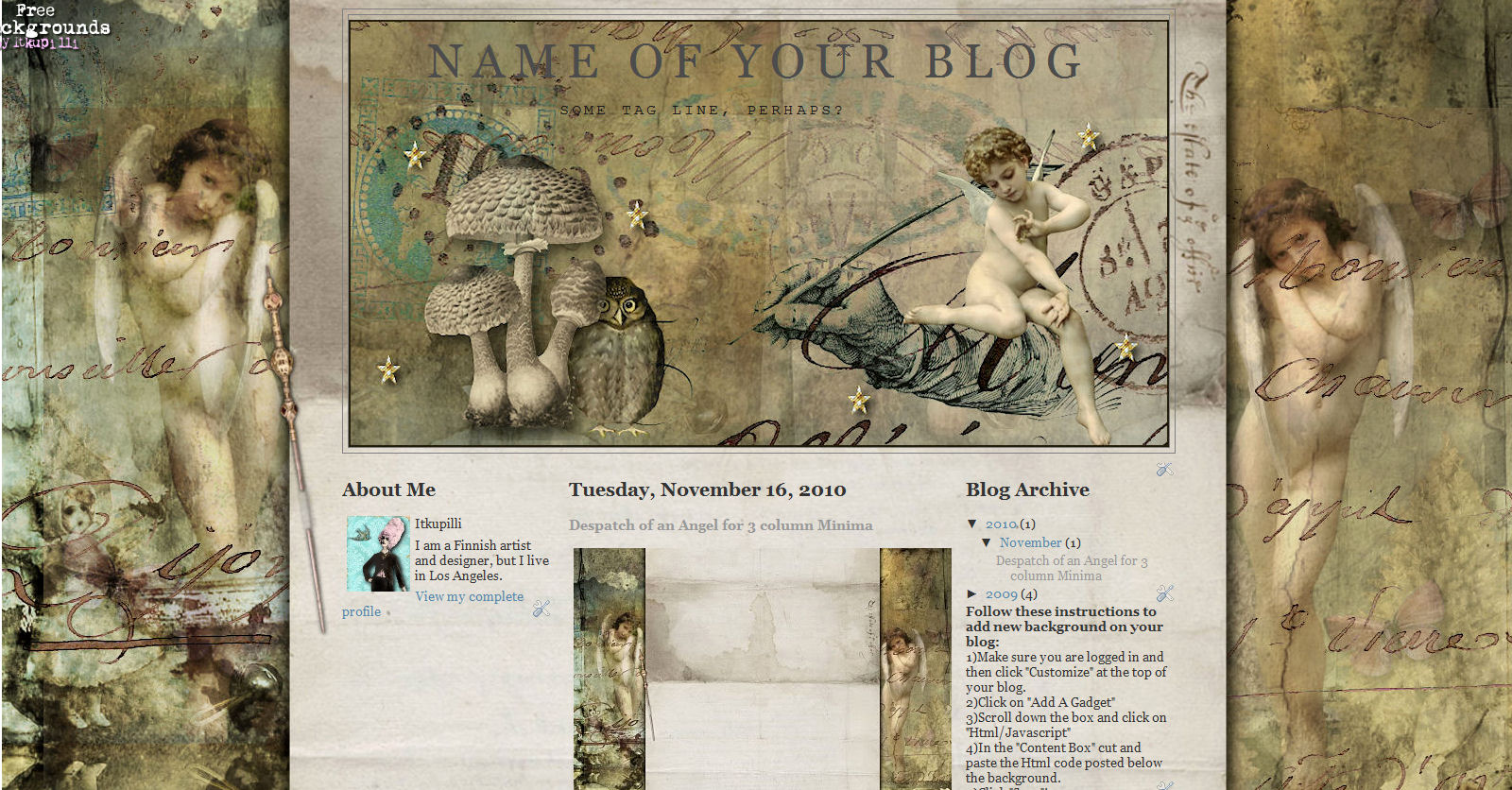
Despatch of an Angel Header for 2 column Minima


1. Click image to enlarge the size.

2. Save picture to your computer.
3. Go to your blog and click customize.
4. Click edit Header.
5. Upload the image from your computer.
6. Placement, choose only "Behind title and description" (NOT shrink to fit)
7. Save.

8. And then go to "Fonts and colors" and choose Blog Title Color and Blog Description Color, which fit with your new banner.


Feel free to use this blog header on your blog, and a link back to Cute and Cool BlogStuff is appreciated.


You can find the matching background here.

post signature

Despatch of an Angel Header for 3 column Minima


1. Click image to enlarge the size.

2. Save picture to your computer.
3. Go to your blog and click customize.
4. Click edit Header.
5. Upload the image from your computer.
6. Placement, choose only "Behind title and description" (NOT shrink to fit)
7. Save.

8. And then go to "Fonts and colors" and choose Blog Title Color and Blog Description Color, which fit with your new banner.


Feel free to use this blog header on your blog, and a link back to Cute and Cool BlogStuff is appreciated.


You can find the matching background here.

post signature

Tuesday, November 16, 2010

Dreaming header for 2 column Minima


1. Click image to enlarge the size.

2. Save picture to your computer.
3. Go to your blog and click customize.
4. Click edit Header.
5. Upload the image from your computer.
6. Placement, choose only "Behind title and description" (NOT shrink to fit)
7. Save.

8. And then go to "Fonts and colors" and choose Blog Title Color and Blog Description Color, which fit with your new banner.


Feel free to use this blog header on your blog, and a link back to Cute and Cool BlogStuff is appreciated.


You can find the matching background here.

post signature

Dreaming header for 3 column Minima


1. Click image to enlarge the size.

2. Save picture to your computer.
3. Go to your blog and click customize.
4. Click edit Header.
5. Upload the image from your computer.
6. Placement, choose only "Behind title and description" (NOT shrink to fit)
7. Save.

8. And then go to "Fonts and colors" and choose Blog Title Color and Blog Description Color, which fit with your new banner.


Feel free to use this blog header on your blog, and a link back to Cute and Cool BlogStuff is appreciated.


You can find the matching background here.

post signature

Friday, May 21, 2010

Matilda's bedroom header for 3 column Minima


1. Click image to enlarge the size.

2. Save picture to your computer.
3. Go to your blog and click customize.
4. Click edit Header.
5. Upload the image from your computer.
6. Placement, choose only "Behind title and description" (NOT shrink to fit)
7. Save.

8. And then go to "Fonts and colors" and choose Blog Title Color and Blog Description Color, which fit with your new banner.


Feel free to use this blog header on your blog, and a link back to Cute and Cool BlogStuff is appreciated.

You can find the matching background here.

post signature

Matilda's bedroom header


1. Click image to enlarge the size.

2. Save picture to your computer.
3. Go to your blog and click customize.
4. Click edit Header.
5. Upload the image from your computer.
6. Placement, choose only "Behind title and description" (NOT shrink to fit)
7. Save.

8. And then go to "Fonts and colors" and choose Blog Title Color and Blog Description Color, which fit with your new banner.


Feel free to use this blog header on your blog, and a link back to Cute and Cool BlogStuff is appreciated.

You can find the matching background here.

post signature

Saturday, February 6, 2010

My Royal Blog header


1. Click image to enlarge the size.

2. Save picture to your computer.
3. Go to your blog and click customize.
4. Click edit Header.
5. Upload the image from your computer.
6. Placement, choose only "Behind title and description" (NOT shrink to fit)
7. Save.

8. And then go to "Fonts and colors" and choose Blog Title Color and Blog Description Color, which fit with your new banner.


Feel free to use this blog header on your blog, and a link back to Cute and Cool BlogStuff is appreciated.

You can find the matching background here.

post signature

Friday, December 4, 2009

Treasure Box header


1. Click image to enlarge the size.

2. Save picture to your computer.
3. Go to your blog and click customize.
4. Click edit Header.
5. Upload the image from your computer.
6. Placement, choose only "Behind title and description" (NOT shrink to fit)
7. Save.

8. And then go to "Fonts and colors" and choose Blog Title Color and Blog Description Color, which fit with your new banner.


Feel free to use this blog header on your blog, and a link back to Cute and Cool BlogStuff is appreciated.


You can find the matching background here.

post signature

Wednesday, November 18, 2009

Pinup header


1. Click image to enlarge the size.

2. Save picture to your computer.
3. Go to your blog and click customize.
4. Click edit Header.
5. Upload the image from your computer.
6. Placement, choose only "Behind title and description" (NOT shrink to fit)
7. Save.

8. And then go to "Fonts and colors" and choose Blog Title Color and Blog Description Color, which fit with your new banner.


Feel free to use this blog header on your blog, and a link back to Cute and Cool BlogStuff is appreciated.


Matching background is here.

post signature

Sunday, September 20, 2009

Venice Header for 3 column Minima

1. Click image to enlarge the size.

2. Save picture to your computer.
3. Go to your blog and click customize.
4. Click edit Header.
5. Upload the image from your computer.
6. Placement, choose only "Behind title and description" (not shrink to fit)
7. Save.

8. And then go to "Fonts and colors" and choose Blog Title Color and Blog Description Color, which fit with your new banner.


Feel free to use this blog header on your blog, and a link back to Cute and Cool BlogStuff is appreciated.


You can find the matching background here.

post signature

Friday, August 7, 2009

Angel Garden header


1. Click image to enlarge the size.

2. Save picture to your computer.
3. Go to your blog and click customize.
4. Click edit Header.
5. Upload the image from your computer.
6. Placement, choose only "Behind title and description" (not shrink to fit)
7. Save.

8. And then go to "Fonts and colors" and choose Blog Title Color and Blog Description Color, which fit with your new banner.


Feel free to use this blog header on your blog, and a link back to Cute and Cool BlogStuff is appreciated.

Matching background here.


post signature

Wednesday, July 29, 2009

Header White Temple

1. Click image to enlarge the size.

2. Save picture to your computer.
3. Go to your blog and click customize.
4. Click edit Header.
5. Upload the image from your computer.
6. Placement, choose only "Behind title and description" (not shrink to fit)
7. Save.

8. And then go to "Fonts and colors" and choose Blog Title Color and Blog Description Color, which fit with your new banner.


Feel free to use this blog header on your blog, and a link back to Cute and Cool BlogStuff is appreciated.


You can find the matching background here.

post signature

Tuesday, June 30, 2009

3 Column Minima, Shabby Grey header with doggie or kittie


1. Click image to enlarge the size.
2. Save picture to your computer.
3. Go to your blog and click customize.
4. Click edit Header.
5. Upload the image from your computer.
6. Placement, choose only "Behind title and description" (not shrink to fit)
7. Save.

8. And then go to "Fonts and colors" and choose Blog Title Color and Blog Description Color, which fit with your new banner.


Feel free to use this blog header on your blog, and a link back to Cute and Cool BlogStuff is appreciated.

Matching background here.

post signature

Monday, June 29, 2009

Gothic Garden #2 decoration

post signature


<a href="http://blo64rt.blogspot.com/"><img border="0" src="https://blogger.googleusercontent.com/img/b/R29vZ2xl/AVvXsEi0hSMAMbQ-Z9TqJuc905o0A_6kw1sqYfltRgHKXuL_rvGi78zoecvryiEcUdD1XX9TvHCd0zLGHZcI5npHQOHbr8hLp_gkVxP9JASRzTQAomoWWQZHQ5pH3ReDdmZtDTa0DReInaQSmKDl/"/></a>


post signature


<a href="http://blo64rt.blogspot.com/"><img border="0" src="https://blogger.googleusercontent.com/img/b/R29vZ2xl/AVvXsEheYFTs_z6AjkmwHC7dvekDXx_4GsujwygzWwF2efJeD4nbbi88eqdo9y7oRNYWTLKnKAjRurgFoQeFmNnCOyduVdBh58MvZmyTrS60B-RLH-9JbOsGGLCYYssU-Qp-HwCdy0N9GtIivL7J/"/></a>


post signature

LinkWithin